| Resources that help you to master GNU/Linux
-- all the way from Australia ! |
GNU/Linux Tutorials
Most of us here at the Linux Supporters Group are pretty
much amateurs at this GNU/Linux stuff; we do not make our living
running Linux. Many of us have come to it later in life, and all of
us have been lucky enough -- in a moment of madness, frustration or
liberation -- to have thrown away our carefully-crafted copy of
RedHat and struggled for a week installing and re-installing Debian
'Potato' ... or something similarly insane, like Slackware ! We
have our favourite distro; none the less, we still experiment with
other distros from time to time.
As we laboriously work something out and get it debugged
and make it a routine process, we are happy to pass on that
experience so that you don't have to spend your time re-inventing
the wheel. We are all immensely grateful for tips and tricks that
we found in all sorts of places - both in books and on the internet
- when we were struggling with something Linux-related, and so here
are some of our tips and tricks as payment in return.
The topics that follow arose in a series of talks and/or
workshops that we held over the past few years --
for our Linux Supporters Group meetings in
Adelaide, for the South Australia Microprocessor Group at the WEA,
for the University of the Third Age at the Box Factory,
with the Adelaide City Library at their Digital Hub,
and for the Southern Fleurieu Linux User Group at
Victor Harbour -- and we present them here in much the
same form.
Here are the tutorials so far in date order (last one is the latest):
- "How to Develop a simple Log Script using Bash"
- "Explore all your Commands with bash, cmd and psh"
- "Comparison of Shell Features of bash, cmd and psh"
- "An Introduction to the X Window System"
- "An Appreciation of the Open Office Suite"
- "Management of Magnetic Tape under Linux"
- "Creating Ad-Hoc Wireless Networks using Linux"
- "A Gentle Introduction to the C Language"
- "Controlling an LCD from Linux"
- "Configuring a Gateway/Router using Linux"
- "KDE 4: History, Development and Features"
- "File Permissions in Linux"
- "Encryption and Decryption: Using GPG in Linux"
- "Viruses, Trojans and Worms in Unix and Linux"
- "Multi-Booting: Tips, Traps and Treasures"
- "Databases: How to manage MySQL via PHP"
- "MemoryBox: A Different Way to Keep your Data Backed Up"
- "Image Processing: Linux Application in a Large Project"
- "How to create a bootable [K]ubuntu System on a USB stick"
- "The Linux Adventure: Linux as an Alternative to Windows 7"
- "PHP and its application to MySQL"
- "Fun with Virtual Machines"
- "A Basic Introduction to the GRUB-2 Bootloader"
- "Using Advanced Options in Google Search"
- "The Kinect Sensor: Dissecting the X-Box"
- "The Development of Chaos Theory"
- "WiFi: Principles, Terminology and Jargon"
- "Overview of micro-, monolithic and hybrid Kernels"
- "Impressive: using it to display PDF files as presentations"
- "Introduction to Cellular Automata (Finite State Machines)"
- "Booting from a USB stick into Linux or to repair Windows"
- "The Linux Command Line: bash 'hands-on' and bash help"
- "A Whole Heap about Spreadsheets"
- "Smart Phones: A Look at the Latest Technology"
- "Tractability (and Intractability!): what can computers solve?"
- "Introduction to the Wayland Graphical Compositing Project"
- "An Introduction to Writing the HyperText Mark-up Language"
- "Bootable Multi-Distro USB Stick with persistent data"
- "Invoking the Bourne-Again Shell (bash): tips and wrinkles"
- "Encryption: An Introduction to the Mathematics behind RSA"
- "Network-Attached Storage using Linux-based Nano-Computers"
- "What Life After XP might look like, and How to Get There from Here"
- "An Introduction to the Python Programming Language"
- "Exercises in Dealing with Remote Computers: SSH and Friends"
- "What Makes Computers Tick: Analysis of a Simple Instruction Set"
- "How Compilers Work: the Low-Down on High-Level Languages"
- "An Exposition of the “docker” Container Virtualisation Technology"
- "How to Login to your Home Computer from Anywhere"
- "Using a USB TV Tuner in Linux + Working with the 'dd' Command"
- "Streaming the RasPiCam video using both /bin/netcat and the gstreamer project"
- "How to and Why Install CyanogenMod on your Phone & Tablet + some Newbie Tips & Tricks"
- "How to get Help about your Linux system + some more Newbie Tips & Tricks"
- "Beginners Bash Scripting for Fun and Profit + A Glimpse of the Raspberry Pi 3 Model B"
- "Analogue Computers + Drawing and Photos using the GIMP"
- "Inkscape: An Introduction to a Vector Graphics Program"
- "Encrypt USB Drive Partitions using the Linux Unified Key Setup"
- "REDIS: a Relational Database Application Described and Explained"
- "The Globally-Unique Identifier Partition Table (GPT) using BIOS and UEFI"
- "OpenStreetMap: Introducing the new breed of GPS Plotters"
- "Installing Debian-9 + Latex and Loving it + A Look at the Linux kernel"
- "Wirelessly Printing to a Printer on a Network"
- "The 'diff' Program: What it's good for, and How it works"
- "Email Encryption: Just Do It! Using mutt on Linux and thunderbird on Mac."
- "Dialog+Espeak+Animation: a New Email Encryption Paradigm."
- "Deep Learning: Applications of Neural Network AI Research."
- "The inxi command + app changes + browsers + the lshw command"
- "Making bootable .iso files on USB"
- "Devuan Linux + webcams + record-desktop + usb-ethernet + sound config"
- "Youtube-dl + heartbleed (libressl) + serendipity (wingles) + trackers (hosts)"
- "LSGA-SECURE: a 'point+click+type' program for managing your private files"
- "Photography in the Raw: get some exposure to cutting-edge techniques"
- "A Bit about Organic Robots: something you didn't know about, eh?"
- "Those .hidden files in your personal directory -- what are they there for?"
- "The amazing Charles Babbage: the Father of the Modern Computer"
- "Snap: one important protocol for managing distro-independent Linux applications"
- "How the Web was Lost: an introduction to Tim Berners-Lee's mission to reclaim it"
- "Musings on Linux: apt; telegram; appimage; libreboot; colour; the edge; computer jokes"
- "Experience with the Model TS-251-D home NAS server from QNAP"
- "KDE Connect: How to Communicate between all your Devices on Local Networks"
- "Linux Home Networking: Some Useful Techniques"
- "X-Do-Tool: set up keystroke combinations and teach your mouse new tricks"
- "The Internet of Things: definitions, options, harware"
- "The Raspberry Pi: Programming the GPIO Pins using the Commandline"
- "Introduction to the Raspberry Pi Pico and Pico W: Architecture and Uses"
- "Demonstration of the latest development of the opensource Linux PinePhone Pro"
- "The Linux 'Screen' Program: how to share a terminal session to provide command-line help"
- "Learn how suitable Linux is for development of Artificial Intelligence Large Language Models"
| Tutorial Description |
Link to Tutorial |
| "How to Develop a simple Log Script using
Bash" is a tutorial for the beginner that introduces you
to the commandline with a vengeance. Here we take you through the
process of creating a facility for logging comments on your
computer so that you can record important events in the system
along with the date and time they happened. The tutorial on the right
takes you through the top down design of an interactive bash session,
and the skills learnt can then be put to good use in all the subsequent
tutorials. |
Develop Log
Script |
| "Explore all your Commands with bash, cmd
and psh" is a tutorial that develops a script that
examines all the commands that you have available on your computer
in a random order, and prints the first few lines of the manual for
that command, so that you can see what is around. It does this
using bash (GNU/Linux), cmd.exe (NT) and psh (XP/Vista) so you can
compare the abilities and the power of these shells. We have
presented it on the right as a PDF file for download. |
Explore all
Commands |
| "Comparison of Shell Features of bash, cmd
and psh" is a tutorial that describes and discusses the
similarities and the differences between the way that bash
(GNU/Linux), cmd.exe (NT) and psh (XP/Vista) get things done on the
command line. These are things that we noticed when implementing
scripting exercises in the 3 shells. The example script finds the
word frequency in files of over 1 million words and measures the
time it takes each shell to complete this task.
This tutorial is a PDF file on the right. |
Compare 3 Shells |
| "An Introduction to the X Window
System" explains what an X Server is, and shows you how to
start as many X Servers as you need on your own computer, so that
you can do many things, such as sharing photos, sharing programs,
and sharing desktops. There are two PDF files for download at
present: the tutorial itself, and some exercises. |
Introduction to X
Xercises |
| "An Appreciation of the Open Office
Suite" takes you through one of our speaker's experience
with the OpenOffice.org suite of programs: Writer (word processor);
Calc (spreadsheet); Impress (slide-show editor), Draw (drawing
editor), Base (database package). It compares and contrasts the
features with experience of other programs, and describes how it
felt to use each feature. It is an Impress slide show, for
download, as it was presented at our meeting. |
OpenOffice
Review |
| "Management of Magnetic Tape under
Linux" takes you through installing and using a couple of
magnetic tape drives: a Quantum TRAVAN drive with an IDE interface,
and a Quantum DAT drive with a SATA interface. The PDF file of the
talk shows what to expect during installation and use as backup. |
Manage Magnetic
Tape |
| "Creating Ad-Hoc Wireless Networks using
Linux" shows you what the IEEE 802.11 standard means by
applying it to configuring a couple of wireless network interface
cards and then using the Linux wireless programs to create a small
ad-hoc network consisting of three laptops.
The PDF files summarise the idea behind the talk and list all the
commands used during the demonstration at our meeting. |
Ad-Hoc Wireless
Slides
Ad-Hoc Wireless
Commands |
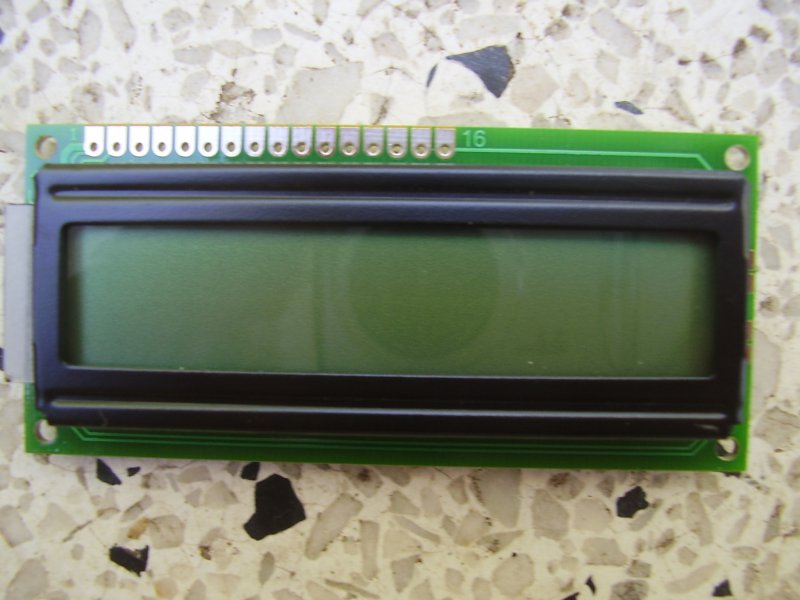
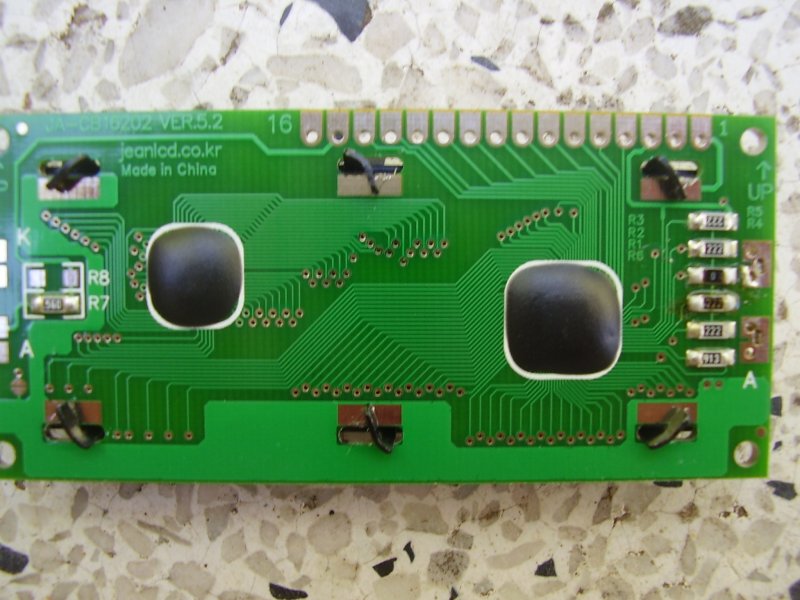
| "A Gentle Introduction to the C
Language" is a PDF file that presents an overview of C
given at our meeting that can orientate you quickly. This goes with
a C program that controls an LCD -- the
JA-SCB16202S-GN12M-LB -- which is a commonly-available item
pictured here (front) and here (back) and wired up to a parallel port as
per the comments in the C program. |
Introduction to
C
LCD program |
| "Configuring a Gateway/Router using
Linux" shows you how to establish the necessary firewall
and routing rules so that you can connect one or more computers
(that have only wired ethernet) to another computer (that has only
unwired - mobile - ethernet) by going through a third computer (that has both
interfaces). The PDF file on the right shows in detail how we configured the third
computer to act as a gateway/router during the demonstration at our
meeting. |
Configure a
Gateway/Router |
| "KDE 4: History, Development and
Features" traces the history of KDE as a desktop
environment, describes the background behind its features, and puts
perspective on its future. The file on the right is a PDF file from the
talk given at our meeting, before the KDE4 demo. |
KDE4: History, Development
and Features |
| "File Permissions in Linux"
describes how file characteristics have evolved from Unix, and
explains what they are and how to use them in Linux. There is a
shell recipe summary here. The PDF file
is from the talk given at our meeting. |
File Permissions
in Linux |
| "Encryption and Decryption: Using GPG in
Linux" describes how to install the GNU Privacy Guard
under Debian Linux and use it to manage some common encryption and
decryption tasks. There is a handy encrypt
script here, and a handy decrypt script
here. The PDF file explains how to use the bash scripts to become
familiar with encryption and decryption. |
Using GPG in
Linux |
| "Viruses, Trojans and Worms in Unix and
Linux" offers an overview of the history of
vulnerabilities in Unix and Linux. It describes the various major
items and the programs they affect. We have provided a copy of
the handout notes here, and we have
provided a copy of the slides from the talk (on the right). |
Viruses, Trojans and
Worms |
| "Multi-Booting: Tips, Traps and
Treasures" gives a very comprehensive description of the
hard-drive multi-booting procedure for XP, Vista and Debian Linux
systems using the GRUB (qv). Hayden has provided a PDF file version of
his talk (on the right). See if you can find Ernest Shackleton's
boot amongst the slides! |
Multi-Booting
Tips |
| "Databases: How to manage MySQL via PHP" takes you through the process of creating, modifying and administering your database using the phpmyadmin program to access MySQL on Linux. Barry has provided a PDF file version of a very comprehensive earlier exposition of SQL (Structured Query Language) on the right,
and beneath that link is the PDF file version of his talk on managing MySQL using
PHP. |
SQL Theory
Using phpmyadmin |
| "MemoryBox: How to manage a secure distributed backup" takes you through the design considerations of the MemoryBox System. Michael has provided a PDF file version of his talk on the right. |
MemoryBox Talk |
| "Image Processing in a Large Project"
shows how Linux, with its roots in Unix and its networking and command-line
constructs, is a natural choice for implementing much of the computation needed
for image segmentation in the ADSS/SAR System..
This system may be adapted to a wide range of other applications.
Peter has provided a PDF file version of his talk on the right. |
Image Processing Talk |
| "How to create a bootable [K]ubuntu System on a
USB stick"
explains the theory behind, and gives a recipe for,
building a bootable Kubuntu 10.04 system for a USB stick.
It describes how to use 'casper' to build the system,
and how to modify GRUB2 to boot it.
Hayden has provided a PDF file version of his talk on the right. |
Bootable Kubuntu USB |
| "The Linux Adventure: Linux as an Alternative to Windows 7"
is the result of a one-day talk at the University of the Third Age in Adelaide,
where we provided an in-depth comparison of Linux versus Windows to a large group of
computer users who were faced with upgrading from XP to Windows 7 --- or not.
We gave them some detailed hands-on familiarity with Linux, and I have provided a PDF file version of the notes we handed out to them, on the right. |
Linux instead of Windows 7 |
| "PHP and its application to MySQL"
shows how PHP, which forms part of the LAMP (Linux Apache MySQL PHP)
system, is used to create HTML that can construct a form for entering
a query of a database maintained by the program MySQL, and display the result. Barry has provided a PDF file version of his talk on the right. |
PHP and MySQL |
| "Fun with Virtual Machines" describes Peter's
experience installing KVM, and discusses various options that face you,
along with how to install a distribution so that it runs under KVM.
He shows that you do not need much to run a virtual machine these days:
just one CPU will do, without any special features, under VirtualBox,
to install a distribution from one of the main operating systems
(Windows, Linux, Solaris, BSD, IBM OS/2) so it runs under the
control of the virtual machine manager.
More advanced managers
(see these notes)
can make use of multiple CPUs.
A PDF file version of his talk is on the right. |
Virtualisation |
|
"A Basic Introduction to GRUB-2 Bootloader"
talks about the GRUB-2 boot-loader program: what it is and what it does;
the booting process; differences between GRUB-2 and GRUB;
commands available at booting; customising GRUB-2; updating GRUB-2 scripts;
and security issues over a network.
A PDF file version of the notes handed out at the talk is on the right. |
GRUB-2 |
|
"Using Advanced Options in Google Search"
explains how to use the advanced search options in Google, and so helps you
to get the best out of your search query.
Barry has provided a PDF file version of the
slideshow from the talk on the right. |
Google Search Options |
|
"The Kinect Sensor: Dissecting the X-Box"
shows how to extract the Kinect Sensor from the XBox
and looks at its capablilities in some detail.
The talk was given in lieu of another talk which has been rescheduled.
A PDF file version of the notes handed out at the talk is on the right. |
Kinect Sensor |
|
"The Development of Chaos Theory"
covers the history and applications, from Lorenz, Sierpinski, Julia, Mandelbrot and others,
and demonstrating fractals, sets, bifurcation and digital imagery construction.
Rick has provided the key articles,
with their various links around which the talk was centered, on the right. |
Chaos Theory
Fractal Documentary
|
|
"WiFi Principles, Terminology and Jargon"
reviews the principles of wifi propagation and management, with a summary of
wifi terminology and jargon, to help orientate newcomers to this field.
Hayden has provided the PDF files of the talk notes on the right. |
WiFi Principles
WiFi Terminology
|
|
"Impressive: using it to display PDF files as presentations"
explains and demonstrates how to create and then display a PDF file as a slide
show presentation, with its novel features. The pdf of the talk is on the right.
|
Using Impressive on PDFs
|
|
"An Introduction to Cellular Automata (Finite State Machines)"
shows how simple arrays of computing elements, following simple rules of
transition from state to state, can develop interesting and unpredictable
patterns, and indicates where these models have practical research applications.
Here is the demonstration C program;
and the pdf used at the talk is on the right.
|
Cellular Automata
|
|
"Booting from a USB stick into Linux or to repair Windows"
is a talk given to the South Australian Microprocessor Group and it
explains what is necessary to boot from a USB stick to a live system
with persistent configuration, using various suitable Linux distros.
The notes on USB booting used at the talk are in a PDF file on the right.
|
Boot from USB Stick
|
|
"The Linux Command Line: bash 'hands-on' and bash help"
is a workshop we held that took participants through a set of exercises
on a network of supplied laptops running Linux. This was in the belief
that the best intro. to bash is to have a hands-on
'trying it out and see what happens' session.
On the right there is a pdf exploring all the bash commands,
a set of bash exercises to try
and notes on how to get help for using the bash command line.
| Explore (bash)
Exercises (bash)
Help (bash)
|
|
"A Whole Heap about Spreadsheets"
is an explanation of how to use spreadsheets, using Libre Office as the program.
It takes you through all the essential commands, tips, tricks and wrinkles
that you need in order to master a range of spreadsheet skills.
Barry has supplied a
preworked example
in openoffice format, here,
and also the notes handed out at the talk (in PDF form on the right);
they are well worth trying out.
| Lots about Spreadsheets
|
|
"Smart Phones: A Look at the Latest Technology"
takes you through the considerations you are faced with when you
decide to get a smart phone. It explains the things to watch out for,
and exposes the benefits and pitfalls of owning one.
Gabriel has supplied the notes of his talk in PDF form on the right.
| Smart Phones Technology
|
|
"Tractability (and Intractability!): what can computers solve?"
is a rare glimpse into the kind of problems that current computers can or
cannot solve exactly in a reasonable time. It explains the ideas in common
use in this field of research, such as the non-deterministic polynomial measure
of tractability. Sample problems that are dissected for illustration include:
the Travelling Salesman, Koenigsberg Bridge, Halting, Timetable, Scheduling and
Sudoku problems. Barry has provided a PDF file of the slides from the talk on the right.
| Tractability (and Intractability)
|
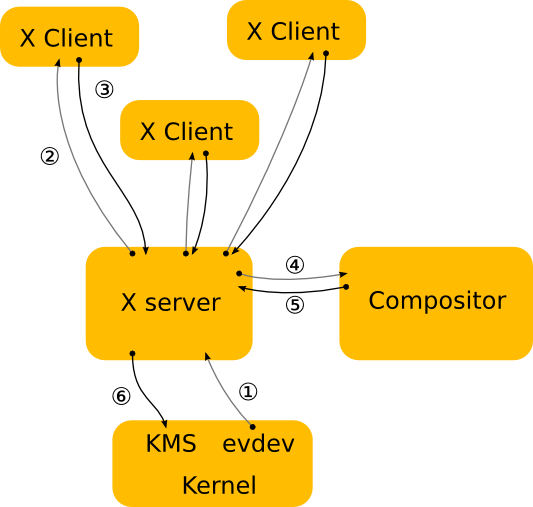
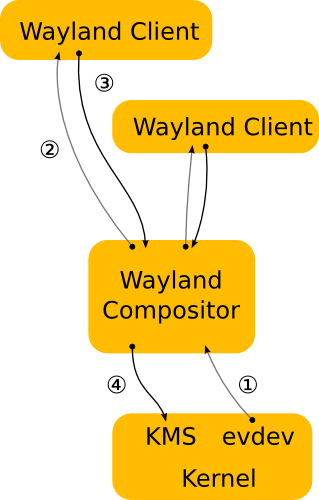
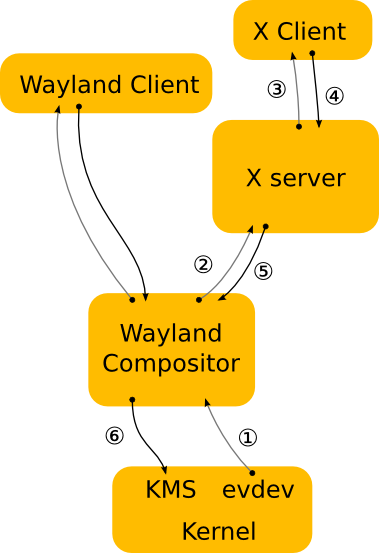
| "Introduction to the Wayland Graphical Compositing
Project" presents an overview of this attempt to simplify and replace
the X-Window protocol for graphical display on computer monitors.
The history of X is covered, and then an explanation of how Wayland
expects to force window managers to be responsible for compositing,
rather than the X server.
A brief schematic of the X architecture is shown
here and a similar brief schematic for Wayland
is shown here.
and a brief schematic of how X might run with Wayland is shown
here.
The rest of the talk
has a glossary of terms used to describe display server functions, and touches
on how Weston and Android provide this functionality.
Hayden has provided a PDF file of the talk on the right.
| Introduction to Wayland
|
| "An Introduction to Writing the HyperText Mark-up Language
" illustrates this talk by showing how to use the popular
HTML to create a simple home page for the web.
Here is some essential information
about HTML from the talk, which should be consulted when examining the
example HTML file.
This is what the
finished page should look like
when you display it using a sensible browser.
Barry has provided a .zip file (on the right) from the talk, which
contains a well-commented HTML skeleton file,
all the necessary auxiliary files and the essential HTML info.
You may download and unzip (v2.0) the
archive, change into the 'html-tutorial' directory,
and explore the effect of amending the 'html.homepage.html' file to
your own requirements.
| HTML Tutorial Files
|
| "Bootable Multi-Distro USB Stick with persistent data"
explains the process of creating a USB stick that has more than one distro
for choosing to boot, with the additional aim of preserving any configuration data
altered during the session for use the next time the stick boots up.
Hayden has provided a PDF on the right that contains a background explanation of
the procedure and details of the required steps.
| Persistent USB Boot
|
| "Invoking the Bourne-Again Shell (bash): tips and wrinkles"
explains what happens on GNU/Linux computers when you invoke bash
during each of: a login, non-login, interactive and non-interactive sessions.
Note is made of the weird way that OSX handles these situations.
All of this is summarized in one handy table.
The PDF on the right contains the talk notes.
| Invoking 'bash': tips
|
| "Encryption: An Introduction to the Mathematics behind RSA"
gives a brief overview of the RSA procedure for protecting texts containing
digital keys and other things.
There is a detailed discussion of just how to create public and private keys,
and how to use them to encrypt and decrypt messages.
Each step is illustrated by a small-scale numerical example.
The PDF on the right contains the details of the talk.
| Encryption using RSA
|
|
"Network-Attached Storage using Linux-based Nano-Computers"
demonstrates the use of Linux on three popular nano-computers — Raspberry Pi,
BeagleBone and CuBox — to provide networked backup.
Some interesting idiosyncrasies are exposed along the way.
The PDF on the right contains the slides handed out during
the talk, without a lot of the intermediate explanation.
| Linux NAS nanocomputers
|
|
"What Life After XP might look like, and How to Get There from Here"
lays out all your options at this dreadful and upsetting time, and goes into some detail about how to proceed in each case and what to look out for.
This is followed by a related topic:
what to do if you decide to install Linux on some older, existing hardware, rather than buy new.
The PDF on the right contains the whole talk.
| XP dead; Linux alive
|
|
"An Introduction to the Python Programming Language"
was run as a workshop, users trying out each feature of python as
it was explained.
The simpler interactive features of Version 2 (print, arithmetic, lists, tuples, range, def, for, functions, procedures, etc.) were illustrated by examples.
Peter has provided the PDF on the right containing the whole talk.
| Intro. to Python
|
|
"Exercises in Dealing with Remote Computers: SSH and Friends"
was run as a workshop. Users wired up their own LAN, established IP addresses,
configured then used the `ssh' and `sshd' programs for remote administration.
The first PDF on the right contains the workshop exercises, comprising a wide range of the most useful network commands.
The second PDF on the right contains a discussion of the openssh suite of programs.
Debugging skills were stretched to their limit.
|
Remote Computers
OpenSSH Programs
|
|
"What makes Computers Tick"
takes us through what happens inside a computer as a program executes. The example is a simple but representative assembler language program. It illustrates the roles of the control unit, arithmetic unit, registers and memory.
Peter has provided the PDF on the right containing the presentation.
| What Makes Computers Tick
|
|
"How Compilers Work: the Lowdown on Highlevel Languages"
takes us in detail through the three stages that compilers use -- analysis, parsing and code generation -- to finally produce machine language intructions. Examples of the sample compiler are explained.
Barry has provided the PDF on the right containing the presentation.
| How Compilers Work
|
|
"An Exposition of the “docker” Container Virtualisation Technology"
takes us through a hands-on tutorial. JoEe explains how you can install docker on your 64-bit system; how to create a 'container' with an 'image' that you want to try out (e.g., debian 'sid', busybox, etc.); and how to proceed from there to install and try out the latest 'iceweasel' for example.
It is also well-worth doing this interactive tutorial in order to come to grips with the common 'docker' commands.
JoEe has provided a copy in pdf of the presentation slides (on the right).
| The 'docker' Technology
|
|
"How to Login to your Home Computer from Anywhere"
explains all the steps needed to log in to your home computer -- to access your own 'cloud' or for all sorts of other reasons.
It assumes that your home computer has been set to boot regularly and stay available for a few hours.
This tutorial looks in detail at the command-line configuration necessary to connect securely from anywhere.
The slides from the talk are on the right along with the detailed instruction handout.
|
Secure Remote Login (slides)
Secure Remote Login (commands)
|
|
"Using a USB TV Tuner in Linux"
covers the theory of transmitting and receiving a television signal, and describes its format.
This is followed by the installation of the firmware for your USB TV tuner and a demonstration of the 'me-tv' program.
"Working with the 'dd' Command"
explores the 'dd' family in detail, including the 'ddrescue' and the 'd3dd' commands.
Hayden has provided a PDF of both talks (on the right) so you can get to work straight away.
|
Using a TV Tuner
Working with 'dd'
|
|
"Streaming the RasPiCam Video"
This tutorial explores how to stream video from the raspberry-pi camera to laptops on a local area network.
There are various ways of achieving this.
Two methods are tried out: using netcat and using the more specialised gstreamer python program.
We look at ways of reducing latency, and of sending the video on to display on other computers in the LAN.
There is a PDF of the tutorial from the talk (on the right).
|
Streaming PiCam Video
|
|
"How to and Why Install CyanogenMod on your Phone & Tablet"
covers the detailed procedure for rooting an older phone and for installing CyanogenMod on a recent phone and an older tablet.
Full details of these procedures are provided in a PDF on the right.
"Newbie Tips & Tricks" introduces you to the ASUS sonicmaster laptop, Chromecast,
and some good stuff for newcomers to Linux.
Syd has provided a PDF for the newbies on the right.
|
Install CyanogenMod on Phone + Tablet
Newbie Tips & Tricks
|
|
"How to get Help about your Linux system"
summarizes all the 'help' commands you have available to you on your system.
Hayden provides full details of these in a PDF on the right.
"Some more Newbie Tips & Tricks"
explores the files system, some Linux Mint apps, and the counting nomenclature used by computers.
Syd provides details in a PDF on the right.
|
Linux 'Help' Commands
More Newbie Tips & Tricks
|
|
"Beginners Bash Scripting for Fun and Profit"
demonstrates techniques for bash-scripting stuff that you, as administrator of your own system,
should find very useful in the course of the day's work.
There is also a neat way of converting groups of sound files without doing too much damage.
Daniel provides full details of all this in the PDF on the right,
which includes a very good bash command summary which has been out of print for some years.
The Raspberry Pi 3 Model B raspbian image can be modified
before writing it to an SD card, and the details of how to do this are in our Interest Section.
|
Bash for Fun & Profit
|
|
"Analogue Computers"
describes how electronic and mechanical components can and have been
used to create simulation systems and other engineering aids in a large
number of fields, ranging from the humble slide rule, through myriad diverse applications,
culminating in a perspective on neural networks.
Barry provides full details of his talk in the PDF on the right.
The Drawing and Photos using the GIMP talk, which Syd has provided on the right,
gives users an overview of what to look out for,
and it has links to various online tutorials.
|
Analogue Computers
Using the GIMP
|
|
"Inkscape: An Introduction to a Vector Graphics Program"
summarizes important aspects of the Inkscape drawing program, describing
what it is, how it works, and where the format fits in to the broader graphics world.
Links are provided to help you further explore this powerful program.
Syd provides slides of his talk in the PDF on the right.
|
Introduction to Inkscape
|
|
"Encrypt USB Drive Partitions using the Linux Unified Key Setup:"
LUKS, the Linux Unified Key Setup, is a Linux standard for disk encryption.
This talk describes the tools needed to encrypt a USB drive partition, and explains how to use them.
Hayden provides his talk in the PDF on the right.
|
Encrypt USB Drive Partitions.
|
|
"REDIS: a Relational Database Application Described and Explained"
takes you through this 'in-memory data structure store' application,
showing how to set it up, add data and extract data from it.
It could be used as a very fast and extremely versatile alternative to MySql on Linux systems.
Peter provides his talk in the PDF on the right.
|
REDIS Relational Database App.
|
|
"The Globally-Unique Identifier Partition Table (GPT) using BIOS and UEFI"
explains in detail the structure of the GPT and how it is used by the old BIOS and by the new UEFI systems.
Hayden provides his talk in the PDF on the right.
|
GPT: BIOS + UEFI
|
|
"OpenStreetMap: Introducing the new breed of GPS Plotters"
takes you through the idea of OSM: a collaborative project to create a free editable map of the world. Details are provided about how this is done.
Syd provides his talk in the PDF on the right.
|
OpenStreetMap
|
|
"Installing Debian-9 + Latex and Loving it + A Look at the Linux kernel"
is a trio of short talks. Debian is installed on an HP 'Stream' notebook, with UEFI and some tricks in providing the missing wireless drivers on a properly-formatted medium. Latex gives a feel for the famous publishing suite. The Linux kernal is compared with the NT kernel and a few other popular ones.
The handout, which contains a full list of references for each topic, is on the right, along with the 'latex' program that produced it.
In addition, there is a list of excellent introductory tutorials to Latex included on the right.
|
Debian + Latex + Kernels
Latex program source
List of Latex Tutorials
|
|
"Wirelessly Printing to a Printer on a Network"
takes you through a detailed and comprehensive tour of the various wireless printing methodologies.
Jan has provided the two handouts on the right, comprising the slides from the talk and a summary of useful and necessary technical terms.
|
Wireless Network Printing
Glossary of Network Terminology
|
|
"The 'diff' Program: What it is good for and How it works"
takes you through Barry's adventures with this seemingly unremarkable program, exposing its great power by reference to his real-life experiences -- well worth reading.
Barry has provided a LaTeX version of his talk in PDF on the right.
|
Adventures with DIFF
|
|
"Email Encryption: Just Do It! Using mutt on Linux and thunderbird on Mac"
explains how to prepare your Linux system for exchanging encrypted emails of a sensitive nature.
It shows how to install and configure the necessary set of programs: 'gpg' for encryption; 'exim' for email transport to the internet; 'fetchmail' to get email from your ISP; and 'mutt' to exchange public keys, read, write, sign and encrypt/decrypt emails and attachments.
It also shows where to find information to configure and use the cross-platform email program 'thunderbird' (available for Linux, Mac and Windows) with the 'enigmail' add-on, to do all the tasks described above.
Greg has provided the handouts on the right, comprising the PDF from the talk and a full set of configuration files that you can use for your own situation.
|
Email Encryption: Just Do It!
GnuPG configuration
Fetchmail configuration
Exim4 configuration
Mutt read/write configuration
Mutt encryption integration
|
|
"Dialog + Espeak + Animation: a New Email Encryption Paradigm"
describes experiments that the LSGA Encryption Working Group is doing to simplify the use of public-key encryption, especially in emails. We want to be able to send a small program to our email correspondent which they can run on their Linux, Mac or Windows system. It sits by their elbow, as it were, and takes them through all the steps they need for exchanging encrypted emails with us, including explaining the concepts using simple animations, talking aloud to them with reminders using the sound system, and showing them what to do using interactive dialogues. They constantly learn the process of encryption while using their favourite email program. The aim is to make email encryption an enjoyable experience.
Greg has provided the PDF on the right which details a simple subset of the whole program to illustrate the implementation of this approach.
|
A New Email Encryption Paradigm.
|
|
"Deep Learning: Research in Artificial Intelligence
is in the news again, this time because Japanese researchers have discovered
how to fool its neural network training paradigms into falsely classifying
images by using a so-called 'one pixel adversarial attack'. In their talk,
Barry and Peter show us what a mathematical model of these deep learning
neural networks looks like. Google, Facebook, Apple and others hope to apply
these models to: driverless cars, robot learning, picture recognition;
and also use them in bionic processors for face and voice recognition.
Barry and Peter have provided the PDF on the right from their talk to illustrate the implementation of these ideas.
|
Deep Learning: AI and Neural Network Research.
|
|
"The inxi command + app changes + browsers + the lshw command"
discusses items of interest arising from our 'Forum' session.
Here Syd looks at the inxi command, some linux application menu changes and some browser observations. Hayden discusses the lshw command.
They have provided the handouts on the right, comprising a summary in PDF from the talk.
|
inxi+menus+browsers
lshw
|
|
"Making bootable .iso files on USB"
takes you through all the things you need to consider if you want to use a USB stick instead of a CD to copy an operating system ISO for booting a Linux distro.
Hayden has provided the PDF on the right from the talk.
|
Make a bootable USB .iso
|
|
"Devuan Linux + webcams + record-desktop + usb-ethernet + sound config"
takes you through an overview of the migration of Debian 8/9 to Devuan 2.0, without systemd.
There are also practical hints about viewing and saving USB Camera streams; how to simply record stuff you do on the graphical desktop; solutions for Ethernet out of USB; and how to systematically send sound+video via laptop HDMI to a TV set.
Greg has provided the PDF handout containing references from the talk (on the right).
|
Devuan 2.0 Migration from Debian 8/9
|
|
"Youtube-dl + heartbleed (ssl) + serendipity (wingle) + trackers (hosts)"
shows you (1) how to download the videos they don't want you to save on your computer;
(2) why and how to use the LibreSSL program instead of OpenSSL in doing ssh and encryption;
(3) how to get the HUAWEI E8372 LTE Wingle to work on Devuan and other Linux distros;
and (4) describes one simple way of reducing the overhead of fetching those pesky trackers during your web browsing.
Hayden provided the 'youtube-dl' handout on the right, and
Greg supplied the 'heartbleed (ssl) + serendipity (wingle) + trackers (hosts)' PDF on the right.
|
youtube-dl
ssl + wingle + hosts
|
|
"LSGA-SECURE: a 'point+click+type' program for managing your private files"
shows you how to simply secure your private data on your PC, especially suited to those who normally avoid the command-line! You just point your mouse at the terminal icon, click it to open, and type one of three commands. There are two versions: one for Linux and one for OpenBSD. It comprises a bash or ksh script which uses the Advanced Encryption Standard.
Greg supplied the 'lsga-secure' PDF, which contains instructions for getting, installing and running the program under Linux and OpenBSD, on the right.
|
lsga-secure
|
|
"Photography in the Raw: get some exposure to cutting-edge techniques"
acknowledges that taking camera photos in 'raw' digital data format (rather than 'jpg')
means that we can massage them extensively later to enhance the image, if we wish.
Syd supplied the 'raw-photography' PDF, which contains details of how to do this, on the right.
|
raw photography
|
|
"A Bit about Organic Robots: something you didn't know about, eh?" takes you on a wide-ranging review of some fascinating recent research into artificial intelligence using robots of quite a novel kind, namely real organisms and organs on a small scale. The researchers suggest possible applications that you have never thought of before! In addition Bob covers the 'AlphaGo Zero' algorithm, which looks like a real breakthrough in artificial intelligence programming.
Bob has supplied his review as a PDF from the talk, with all references, on the right.
|
organic robots
|
|
"Those .hidden files in your personal directory -- what are they there for?"
exposes myriad .config directory contents in your HOME directory, and explains what they are doing there.
He promises his next talk warns against relying on them during an upgrade.
Syd supplied the PDF of his talk on the right.
|
$HOME/.config files
|
|
"The amazing Charles Babbage: the Father of the Modern Computer"
takes you through the long history of his development of the Difference Engine,
how it works in theory, and how they constructed a successful one in London recently.
Barry has supplied the slides from his talk in PDF on the right.
|
Charles Babbage
|
|
"Snap and snapd: a look at one of the important protocols for packaging and executing a distro-independent application for Linux"
explains why 'Snaps' were invented.
It takes you through its features and how to install and run a Snap.
It includes extensive references about all aspects of Snaps, and where to find more information
about Appimages, Docker, Flatpak and Snaps.
Hayden has supplied the slides from his talk in PDF on the right.
|
Snap and snapd
|
|
"How the Web was Lost" is an introdution to Tim Berners-Lee's view of what has gone wrong since the beginning, and explains his mission to set out to reclaim much of the original promise of the internet.
Syd has supplied the slides from his talk in PDF on the right.
|
How the Web was Lost
|
|
"Musings on Linux"
comprises a selection by Syd of items of interest to Linux users at the moment; viz., apt, telegram, appimage, libreboot, colour in the terminal, the edge browser, and some computer jokes. He has supplied the slides from his talk in PDF on the right.
|
Syd's Musings on Linux
|
|
"Experience with using the Model TS-251-D home NAS server from QNAP"
comprises an overview of the capabilities of this NAS product and Neil's experience using it for his own photo backup system, along with things to watch out for. He has supplied a PDF version from his talk on the right.
|
Experience with the TS251D NAS
|
|
"KDE Connect: How to Communicate between all your Devices on Local Networks" explains what the KDE-Connect App can do, and shows how to install it, configure it and control your devices and transfer files between them. Jan has supplied a PDF version from his talk on the right.
|
How to Use KDE-Connect
|
|
"Linux Home Networking: Some Useful Techniques" describes in detail how to simplify administration of your home local area network (and your wide area network website, if you have one) by establishing fixed IP addresses handed out by the home router, and by arranging for logins without being prompted for a password every time. A PDF version from the talk is on the right.
|
Linux Home Networking Techniques
|
|
"X-Do-Tool: " explains and demonstrates how to how to set up keystroke combinations and teach your mouse new tricks. It is particularly useful for generating typed shortcuts when a key combination is pressed. Ian has provided a PDF version from his talk on the right.
|
X-Do-Tool: using it for typing shortcuts
|
|
"The Internet of Things: definitions, options, hardware" explores in some detail the field of IoT, discussing its definition, various options for its implementation, and demonstrating some hardware involved. Bob has provided a PDF version from his talk on the right.
|
The Internet-of-Things: an Exploration
|
|
"The Raspberry Pi: Programming the GPIO Pins using the Commandline" explores in detail how to program the GPIO pins of the Raspberry Pi nano computer. It sets up a PiCam, which streams video of a breadboard, on which simple LEDS are turned on and off by commands in a bash script running on a RasPi with its GPIO pins connected to the breadboard. Greg has provided a PDF version from his talk on the right.
|
Bash Control of the RasPi GPIO Pins
|
|
"Introduction to the Raspberry Pi Pico and Pico W: Architecture and Uses" describes the features of these inexpensive stand-alone microcontrollers, and explains how to get started with them using micropython or C. The hardware is explored, along with some useful resources available on the internet, and some experienced tips and hints. Neil has provided a PDF version from his talk on the right.
|
The Raspberry Pi Pico and Pico W
|
|
"Demonstration of the latest development of an opensource (non-Android, non-iOS) Linux phone" describes the features of a PinePhone Pro, and shows the boot sequence and the resulting desktop and apps. An assessment of the phone is offered. Anthony has provided a PDF version from his talk on the right.
|
The Linux PinePhone Pro
|
|
"The Linux 'Screen' Program explains and demonstrates how to quickly, simply, intimately and safely share a terminal session with another user on another computer to provide help with their command-line programs. Greg has provided a PDF version from his talk on the right.
|
The Linux 'Screen' Program
|
|
""Learn how suitable Linux is for development of Artificial Intelligence Large Language Models" explores the various facets of artificial intelligence and indicates how you can experiment with AI yourself -- offline -- on your own computer at home. Syd has provided a PDF version from his talk on the right.
|
AI and LLM using Linux
|